
Current conditions for a city you choose.
On this page
Current weather conditions for a city you choose. It does not need a Homey device — the data comes from a weather service.
Settings
| Setting | What it does |
|---|---|
| Weather of city | The city to show conditions for |
| Use Fahrenheit | Show temperatures in °F instead of °C |
That is the whole card. It is deliberately simple.
What it shows
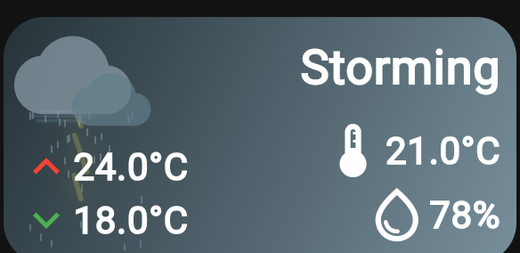
- The current temperature.
- A "feels like" temperature, labelled Seems.
- Conditions, with an animated illustration that matches — rain, snow, sun, cloud.
Weather or Forecast?
- Weather — what it is doing right now.
- Forecast — what it will do over the coming days.
They work well side by side: current conditions in a small card, the outlook in a wider one next to it.
Tips
- Give the animation room. The weather illustration is the nicest part of this card and it needs space. A cramped card hides it.
- Your own sensor is better for indoors. This card reports the city's weather, not your garden's. If you have an outdoor sensor on Homey, a Device card pointed at it is more accurate for your actual location.
- Fahrenheit is per card. The toggle lives on this card, so a dashboard shared with someone in the US can use different units from the rest of your setup.
If the city is wrong
Search for the city again in the card settings and pick the correct entry — many city names are shared between countries, and the closest match is not always the one you meant.