
Stack several devices, flows and dashboards into one compact list card.
On this page
A Multicard is a single card containing a vertical list of rows. Each row behaves like a small Device, Flow or Dashboard card.
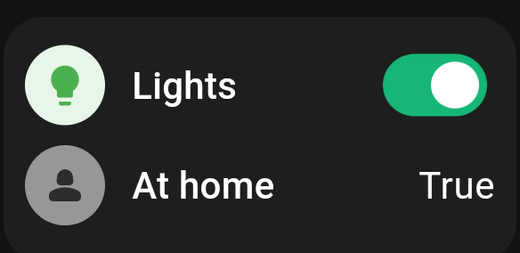
It is the answer to running out of space. Six Device cards fill a phone screen; six Multicard rows fit in a corner of it.
When to use one
- The long tail. Devices you want visible but rarely touch.
- A room summary. Every light in the study, in one card.
- Mixed content. A row that toggles a light, a row that runs a flow and a row that opens another dashboard, grouped together.
For the things you touch every day, full Device cards are easier to hit and can carry their own colour.
Building one
Add the Multicard, then use the + inside it to add rows. Each row is configured like the card it mirrors — pick a device, a flow, or a dashboard to open.
Reordering rows
In edit mode each row has its own menu with Move Up, Move Down, Move to Top and Move to Bottom. On a long list the last two save a lot of tapping.
Settings
| Setting | What it does |
|---|---|
| Title | The card's heading |
| With header | Show or hide the heading strip at the top of the card |
Turning With header off gives you a clean list with no title bar — useful when the surrounding Title cards already say what the group is.
Row behaviour
Each row does the obvious thing when tapped:
- A device row toggles the device, or shows its value if it is a sensor.
- A flow row triggers the flow.
- A dashboard row opens that dashboard.
Rows with an on/off capability show a switch on the right. Rows with a reading show the value instead.
PIN protection
PIN protection is set on the Multicard as a whole, not per row. When it is locked, the entire card — every row — asks for the code before anything responds. See PIN protection.
If you need one device protected and the others free, give that device its own Device card and lock that instead.
Tips
- Scrolling. A Multicard taller than its rows scrolls internally. It is fine to put ten rows in a card six rows tall, though a shorter list is usually easier to read.
- Colour. The card's background colour in the Style tab applies to the whole card. Individual rows tint themselves from their device where relevant.