
The settings unique to each card: device, title, icon and controls.
On this page
Every card is configured through the same dialog, reached from the ⋯ menu on a card in edit mode and then Edit.
The dialog has three tabs:
| Tab | Contains |
|---|---|
| General | The settings unique to this card type |
| Advanced | On-tap behaviour, confirmation, PIN, companion identifier |
| Style | Colours, font size, layout |
Advanced and Style are the same for every card. General is where cards differ, and this page describes the settings that recur across many of them.
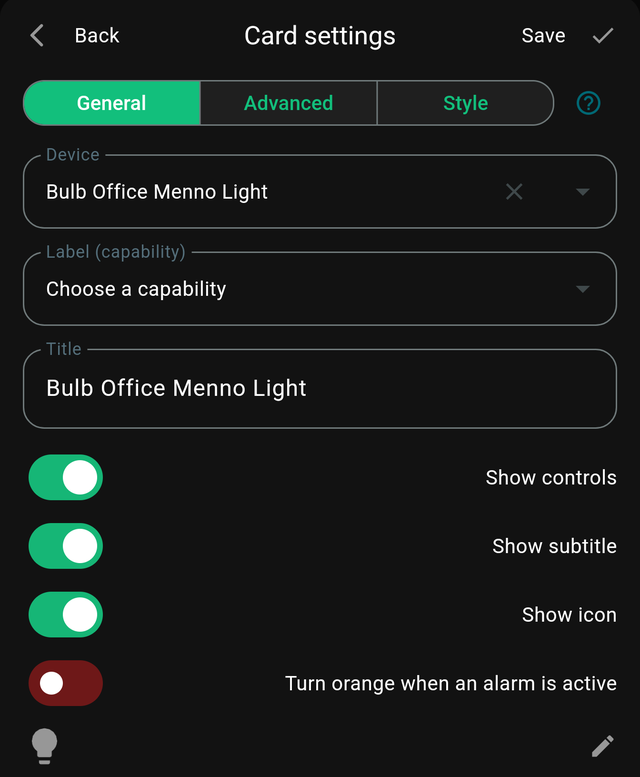
Nothing is saved until you press Save.
Device
Which Homey device the card points at. Devices from every connected Homey are listed together.
Changing this repoints an existing card, which is the quickest way to build a second room: duplicate a card and swap the device.
Label (capability)
On a Device card, which capability provides the card's main displayed value.
Leave it empty and the card chooses sensibly on its own. Set it when a device reports several things and you want a specific one — measure_power on a smart plug that also reports energy totals.
Title
Overrides the name that would otherwise be used, usually the device's or flow's name in Homey.
Worth setting when the Homey name is long or technical. Living room ceiling spots (Zigbee group 3) is a fine name in Homey and a terrible one on a dashboard; call it Ceiling.
Show icon
Shows the device or flow icon on the card. Turning it off gives a text-only tile, which can look cleaner in a dense grid.
Show title / Show subtitle
Show title displays the title text. Show subtitle displays the device name underneath it.
The subtitle is redundant when the title already names the device, which is why it is worth turning off once you have set a custom title.
Show controls
Shows the interactive parts — sliders, buttons, switches. Turning it off makes the card a display.
Combine it with an on-tap behaviour of None in the Advanced tab for a card that shows a value and cannot be pressed at all.
Unit
Text appended to the value, such as °C, kWh or ppm. Cosmetic only — it does not convert anything.
Precision
How many decimal places to display. 0 for whole numbers, 1 for temperature. More precision than the sensor actually has just makes the number look unstable.
Refresh interval
How often a card re-reads its source. Longer intervals are gentler on your Homey and on your battery.
Most device data arrives as it changes, so this matters mainly for cards that poll — Image, Gauge and Flow token.
Per-card settings
For settings unique to one card type, see that card's page in the card reference.