
Every card type HDashboards offers, and which one to reach for.
On this page
Cards are the building blocks of a dashboard. Add one with the + button in edit mode and pick a type from the gallery — each entry shows a live preview.
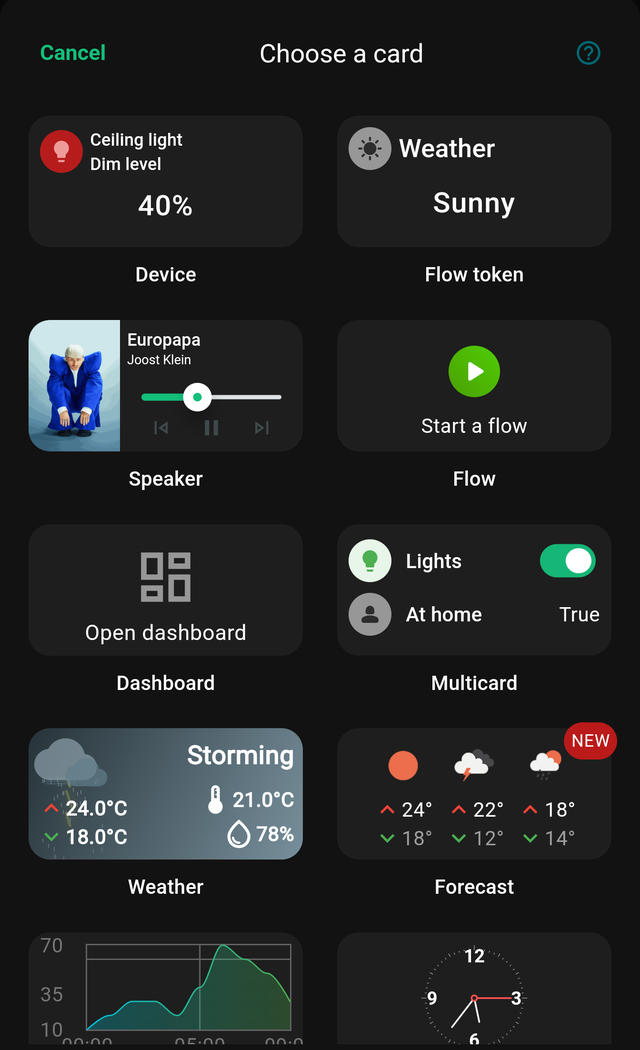
Every card, whatever its type, shares the Advanced and Style tabs. What differs is the General tab.
Control and monitor
| Card | Use it for |
|---|---|
| Device | One Homey device: a light, switch, sensor, blind or lock |
| Multicard | Several devices stacked in one compact list |
| Thermostat | A dial for setting target temperature |
| Speaker | Now playing, transport controls and volume |
Automation
| Card | Use it for |
|---|---|
| Flow | Trigger a flow or advanced flow with one tap |
| Flow token | Show the live value of a flow token or variable |
| Dashboard | A tile that opens another dashboard |
Data and history
| Card | Use it for |
|---|---|
| Gauge | A dial showing a value against a range |
| Insight graph | Homey Insights history plotted over time |
| Battery | Devices whose battery has dropped below a threshold |
Information
| Card | Use it for |
|---|---|
| Weather | Current conditions for a city |
| Forecast | A multi-day outlook |
| Calendar | An iCal calendar as month, week or agenda |
| Timeline | Your Homey timeline, optionally filtered |
| Syslog | A live syslog feed |
| Analog clock | A round clock face |
| Digital clock | The time as text |
Layout and media
| Card | Use it for |
|---|---|
| Title | A text label for grouping areas of a dashboard |
| Image | A picture from your uploads or a URL |
| Video | A live camera or video stream, including RTSP |
| Webview | An embedded web page or your own HTML |
Choosing between similar cards
A few pairs cause confusion:
- Device vs. Multicard. One device per card gives you big, tappable tiles and per-card colours. A Multicard fits six devices in the space of two, but each row is smaller. Use Device cards for the things you touch daily and a Multicard for the long tail.
- Gauge vs. Insight graph. A gauge shows the value now. An insight graph shows how it got there.
- Device vs. Thermostat. A Device card pointed at a thermostat gives you a slider. The Thermostat card gives you a proper dial with step control.
- Image vs. Video vs. Webview. A still picture that refreshes is an Image card; a continuous stream is a Video card; anything interactive is a Webview.
Cards that need something extra
- Insight graph needs the device to have Insights enabled in Homey.
- Calendar needs a public ICS link.
- Video and Webview are marked Experimental in the app — they work, but behave differently across platforms.
- Flow token cards can only show tokens your Homey actually exposes.